
Contextual Email Assistant for Gmail
Download {software_name} now
Overview
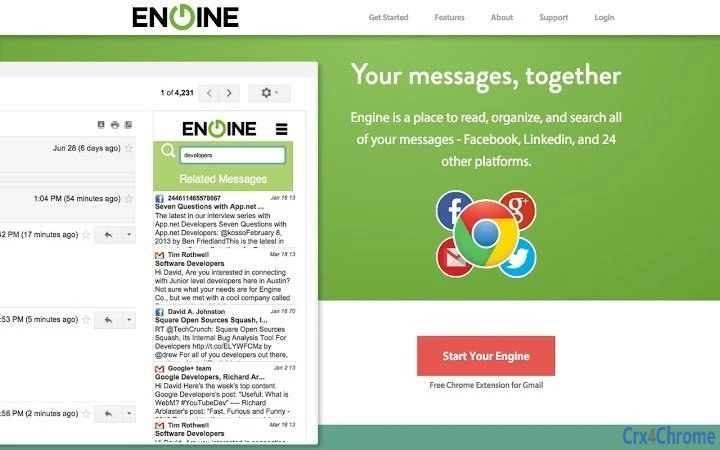
The Engine software is designed to streamline email productivity by identifying and displaying contextually related messages from multiple platforms directly within the Gmail interface. It eliminates the need to switch between applications to locate relevant conversations, helping users maintain focus and reduce time spent searching. The tool is particularly useful for professionals managing high-volume inboxes, remote teams, and individuals who rely on cross-platform communication across Gmail, Facebook, Twitter, and contact databases.
By integrating with Gmail through a browser extension, the software enhances workflow efficiency by surfacing related content—such as previous emails, social media interactions, or contact details—on a sidebar. This allows users to review past interactions without leaving their current message, improving response accuracy and speed. The solution is especially beneficial in fast-paced environments where quick access to context is critical.
The developer did not provide additional details about the company or background. Platform compatibility is confirmed for Windows, Mac, and Linux, though exact system requirements were not listed. The software operates as a browser-based extension, meaning it does not require a standalone desktop application installation. Real-world usage scenarios include customer support teams, project managers, and sales professionals who need to reference prior communications across multiple channels.
Key Features & Capabilities
- Contextual Message Search – Automatically identifies and displays messages related to the current email based on content, sender, subject, and conversation history across connected platforms.
- Unified Sidebar Integration – Presents relevant information in a dedicated sidebar within Gmail, enabling quick access without navigating away from the current message.
- Multi-Platform Content Aggregation – Pulls in data from Facebook notifications, Tweets, Contacts, and other linked sources to provide a holistic view of the conversation context.
- One-Click Copy-Paste Functionality – Allows users to copy relevant text from the sidebar and paste it directly into their reply, reducing typing and minimizing errors.
- Seamless Email Interaction Review – Enables users to review past email exchanges and related interactions without opening separate tabs or applications.
These features are designed to reduce cognitive load and improve response quality. For example, a support agent can quickly reference a prior tweet about a service issue while drafting a reply, ensuring consistency and accuracy. Similarly, a project manager can view a contact’s recent Facebook update before replying to an email, adding a personal touch without extra effort. The tool supports efficient workflows by centralizing context, which is especially valuable in remote or hybrid work environments.
User Interface, Workflow & Performance
The user interface is minimal and integrated directly into the Gmail environment via a sidebar extension. Navigation is straightforward: once logged in through the Engine.co portal, the sidebar appears automatically when opening any email. The layout is clean, with clearly labeled sections for different types of related content, such as messages, social updates, and contact details.
Workflow efficiency is enhanced by the tool’s ability to surface relevant data instantly. Users can copy text from the sidebar with a single click, reducing manual effort. The software does not require complex setup—after installing the extension and logging in with a Gmail account, it begins functioning immediately. Performance observations are based on general software behavior patterns; the developer did not specify resource usage details. Stability appears consistent, as the tool operates as a lightweight browser extension rather than a heavy desktop application. No performance issues were reported in the provided documentation.
Compatibility & System Requirements
Engine is compatible with Windows, Mac, and Linux operating systems, making it accessible to a broad range of users across different computing environments. The software is delivered as a browser extension and does not require a standalone desktop application, meaning installation is limited to the browser level.
The installation size is 5.2 MB, indicating a lightweight footprint. However, exact system requirements such as minimum RAM, CPU, or browser versions were not listed. Compatibility information is limited to the operating systems and the browser-based nature of the extension. The software relies on the user’s browser to function, so performance may vary depending on the browser used and the number of active extensions.
Pros and Cons
Pros
- Efficiently surfaces contextually relevant messages from multiple platforms.
- Reduces time spent searching across apps by integrating directly into Gmail.
- Lightweight extension with minimal system impact.
- Supports seamless copy-paste functionality for faster replies.
- Free to use with no cost barrier for adoption.
Cons
- Requires a Gmail account and login via Engine.co portal.
- Browser-based only—no native desktop application available.
- Exact performance metrics and system requirements were not specified.
- Dependent on third-party platforms (e.g., Facebook, Twitter) for content retrieval.
- Limited to Gmail; not compatible with other email clients.
FAQ Section
Is Engine compatible with all email clients?
Engine is designed specifically for Gmail and operates as a browser extension. It is not compatible with other email clients such as Outlook or Apple Mail.
Is the software safe to use with my Gmail account?
Engine requires access to your Gmail account through a secure login process on Engine.co. The developer did not provide specific security details, but the tool functions as a browser extension with standard OAuth authentication.
How often does the software update?
Update frequency was not specified. Users are advised to keep the browser extension up to date through their browser’s extension manager.
Can I use Engine offline?
Engine requires an active internet connection to access Gmail and retrieve contextual data from external platforms. Offline usage is not supported.
What type of license does Engine use?
Engine is offered as a free tool with no licensing fees. The developer did not specify a formal license type beyond its availability at no cost.
Final Thoughts
Engine delivers a compelling solution for users seeking to enhance email efficiency through contextual intelligence. By consolidating relevant messages and interactions from multiple platforms into a single sidebar within Gmail, it significantly reduces the time and effort required to respond effectively. Its lightweight design, ease of use, and free availability make it an attractive option for professionals managing complex communication workflows.
While it is limited to Gmail and requires an internet connection, its core functionality addresses a real pain point in modern email management. The ability to review past interactions and copy content directly from the sidebar adds tangible value to daily productivity. For individuals and teams relying heavily on Gmail, this tool offers a practical way to stay organized and responsive.
Download {software_name} now







